A classroom web app for elementary science. Students ask an AI for explanations, images, comics and short videos, collect them on a personal board, record how they checked each item, and write their own explanation. They sign in with a student number and name; the teacher manages students, notebooks and daily spend from one screen.
ROLERequirements · lesson-plan mapping · build and verification with Claude Code · deployment
PERIOD2026.09
BUILT WITHFastAPI · Claude Sonnet · GPT Image 2 · Kling 3.0 · Neon Postgres · Vercel · Claude Code
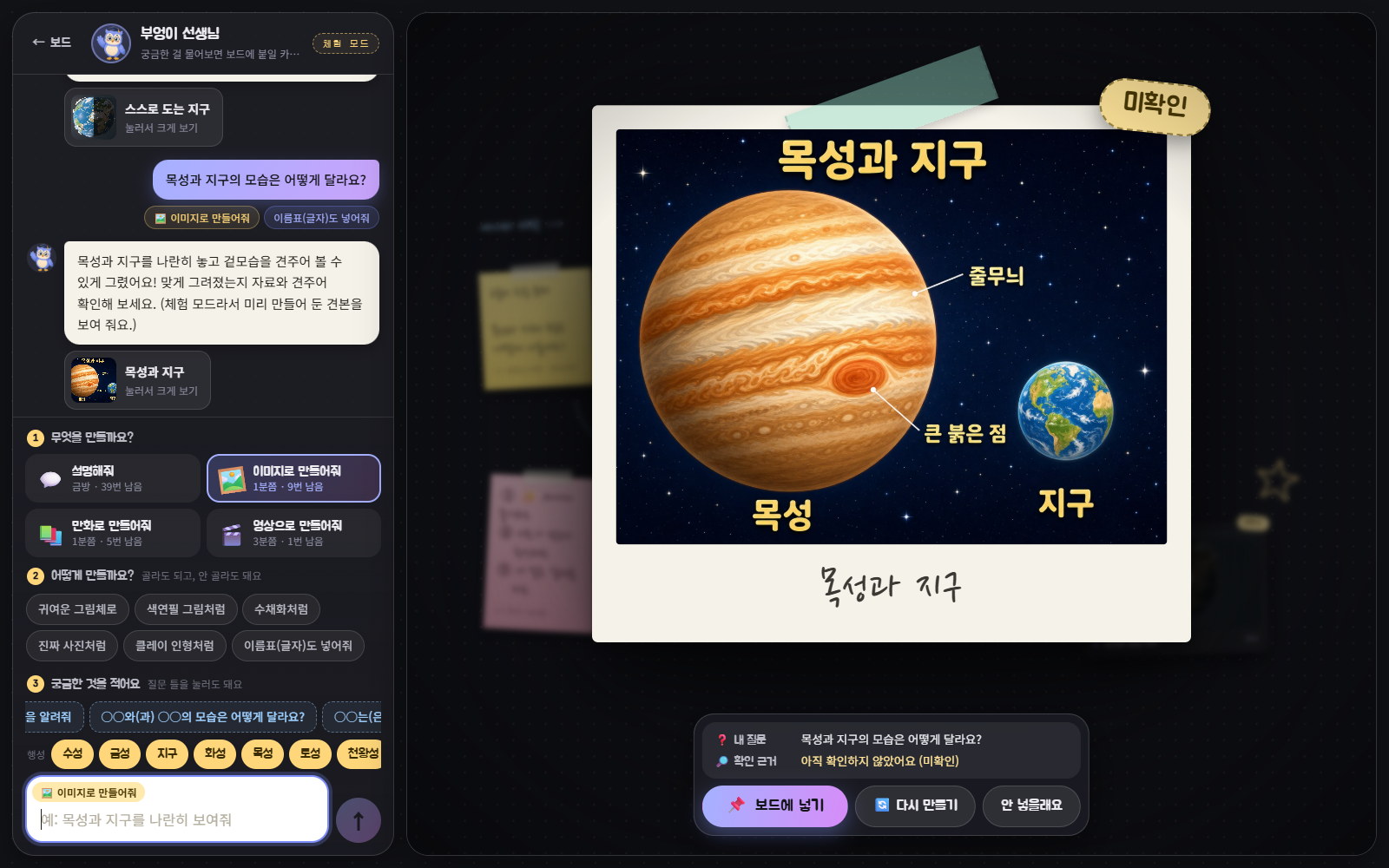
Banjjak Note · 반짝 노트Actual screen in demo mode. The image is a sample pre-generated with GPT Image 2 using this app’s prompt rules; the public site answers with the same samples.
Korean text elements rendered correctly
28 / 28
GPT Image 2 medium · 5 verification images
Videos with the correct rotation direction
0 / 2
Kling 3.0 · two prompts · why cards start unverified
Estimated cost per student per class hour
≈ ₩885
5 explanations + 3 images + 1 video · text cost estimated
01 / PRODUCT
What the classroom needed
Built for the grade 4–6 science unit on the solar system. The lesson plan asks students to form a question, get material from a personal AI, correct errors in that material and record evidence, keep their question, material, evidence and explanation on a board, then cover the explanation and answer a wrap-up question. The app turns that sequence into screen features.
The brief had ten items: sign-in with a student number and name and no signup; teacher-side delete and restore; a notebook shelf; an infinite-canvas board; an AI screen split into chat and board, with tappable helper words; a visible move of each result onto the board; taking the board home by email or image; three models for text, images and video; a screen children want to use; and making the artwork the UI needs with image models.
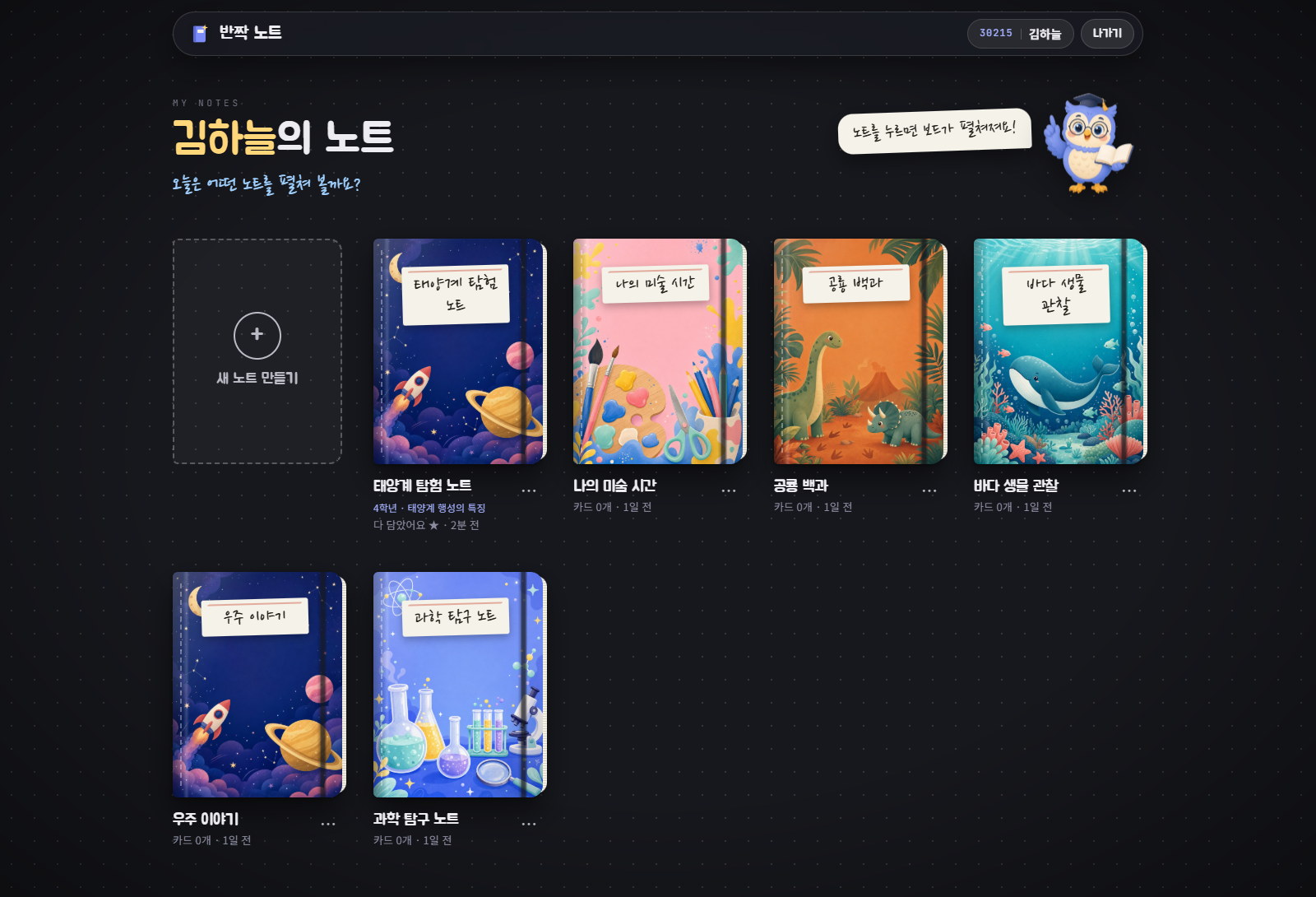
01Sign in
Student number + name · no signup
02Pick a notebook
A lesson adds its learning question to the board
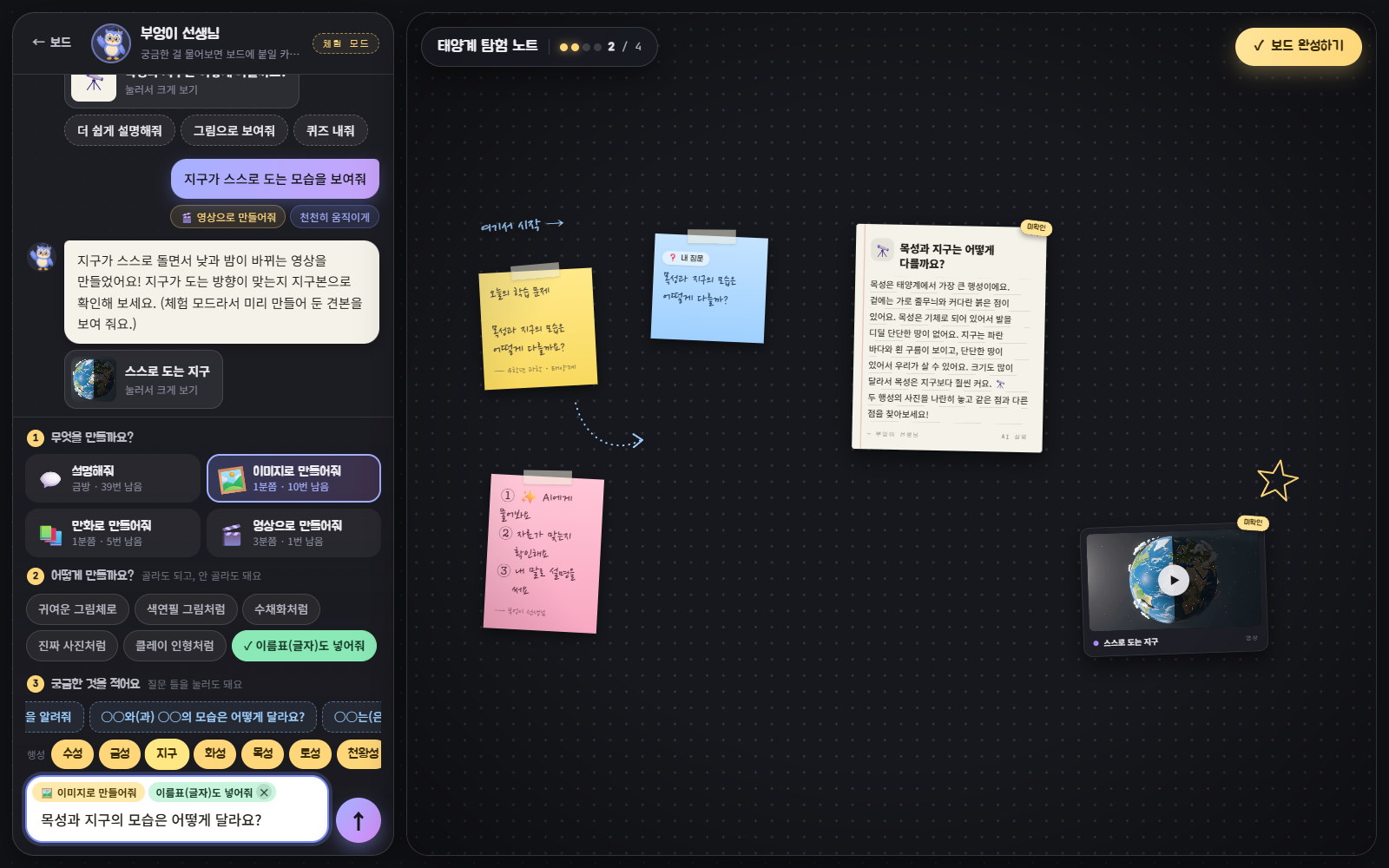
03Ask the AI
Format · helper words · question frames
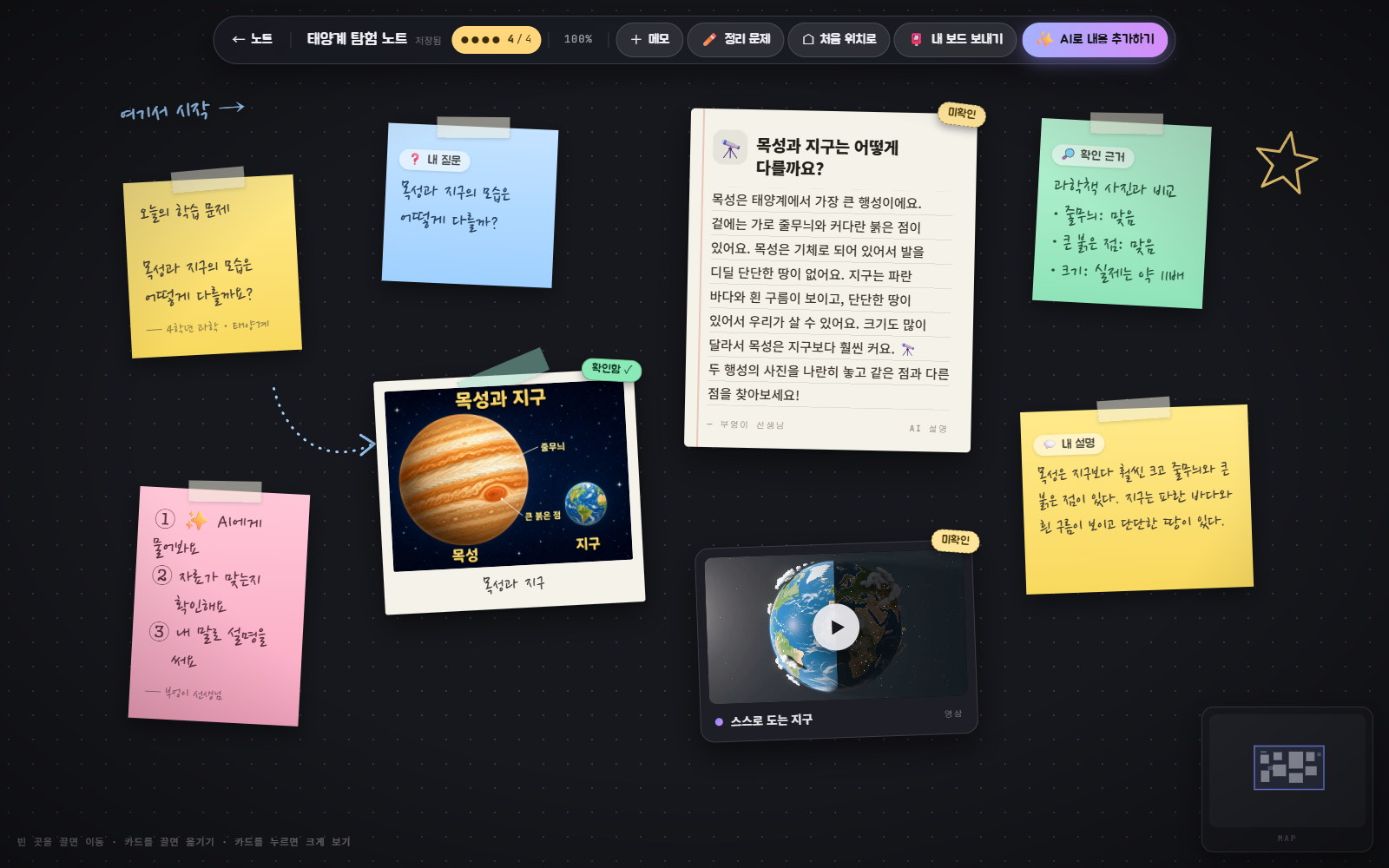
04Keep on the board
Unverified → evidence → own explanation
Notebook shelf · the eight covers and the owl teacher were made with GPT Image 2Dropping word chips into a frame also fixes the Korean particle (“목성과 지구”)
02 / LESSON DESIGN
Turning the lesson plan into features
Each step of the lesson plan has a matching screen control and a server rule. The learning question, question frames, word chips, cautions and wrap-up question differ by grade; presets for grades 4, 5 and 6 are included.
Lesson step
On screen
Server rule
Build a question from a frame
Five frames per grade with word chips · automatic particle fix
Grade fact sheet appended to the Claude system prompt
Choose a format
Explanation, image, comic or video, plus up to four helper words
Per-student daily limits and a class-wide daily budget
Correct errors and record evidence
AI cards arrive stamped “unverified” and switch to “verified” once evidence is written
A verified flag without evidence text is rejected
Keep question, material, evidence and explanation
A four-dot checklist on the board
The same rule is computed on both server and client
Cover the explanation and answer the wrap-up
The wrap-up button covers the explanation and opens an answer note
The cover flag is accepted only on those two note types
Board · sample data for a fictional student. The four dots track the lesson’s four required itemsTapping a card zooms it to the centre with its evidence and correction
03 / SYSTEM
Generation that survives serverless
A video takes two to three minutes, but a serverless function stops once it responds. Instead of a separate worker, generation is a state machine that advances one step each time the browser polls: thinking → waiting → making → saving → done.
The prompt written by Claude is stored first, and the external job ID is saved as soon as it is returned. If the function restarts, or the page is closed and reopened, the same job is picked up again. If moving the result into storage fails, only the transfer is retried, not the generation.
A 90-second database lock keeps two requests from advancing the same job. At most three jobs are submitted to Higgsfield at once; the rest wait with an “n ahead of you” message. Each student can run one generation at a time.
Storage has two modes behind the same code: SQLite and files on a local machine, Neon Postgres and Vercel Blob on Vercel. Because the AI screen and the board screen can edit the same board, a save overwrites only when the revision number matches; otherwise the latest board is returned.
01Request
Check limits and budget, then record
02Plan
Claude writes a scene plan as JSON
03Generate and store
GPT Image 2 · Kling 3.0 → storage
04Preview
Place on the board or regenerate
04 / MODELS
Models and prompt rules
Text comes from Claude Sonnet in an elementary teacher’s voice: polite informal Korean, one idea per sentence, hard words explained in parentheses, three to five sentences, and a closing question to try. Replies follow a JSON schema that separates title, body and three follow-up suggestions.
For images, comics and videos, Claude writes a scene plan and the server assembles a fixed-format prompt. To get Korean text right, the scene is described in English, Korean words appear only inside double quotes with their position, text is limited to one title and eight short labels, and the same rule sentence closes every prompt. Images that need no text get a no-text sentence instead.
With these rules, all 28 Korean text elements in five verification images were correct at GPT Image 2’s medium quality. The default quality is therefore medium (1 credit) rather than high (3.5 credits).
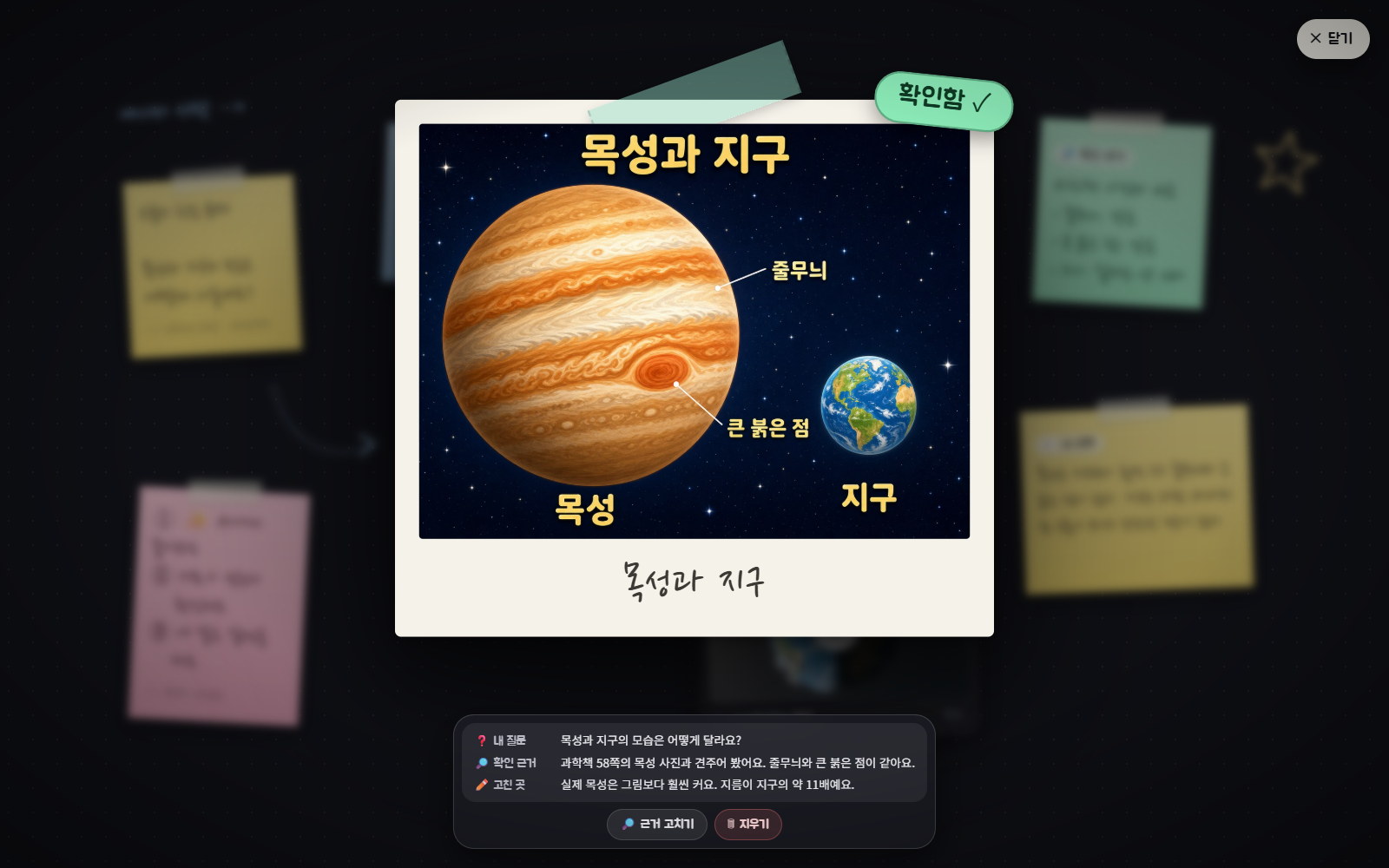
Factual accuracy was another matter. The Jupiter–Earth image drew the diameter ratio at about 3× (the real ratio is about 11×), and both Earth-rotation videos, made with two different prompts, spun the wrong way. Rather than swap models, AI cards enter the board as “unverified” and the student records evidence and corrections.
Two prompts · the demo sample was corrected by reversing playback
Jupiter–Earth size ratio
Drawn at about 3×
The real diameter ratio is about 11×
05 / COST
What each generation costs
So a teacher can plan a budget, credits and tokens are converted to Korean won and shown as a price per use. The basis is ₩1,360 per US dollar and US$0.048 per Higgsfield credit.
Per-student daily limits (40 explanations, 10 images, 5 comics, 2 videos) and a class-wide daily budget (₩30,000 by default) are checked before a request is accepted. Past either one, generation stops for the day; the teacher can also switch off video alone.
Item
Per use
Basis
Explanation
≈ ₩13
Claude Sonnet · estimated tokens, not measured on live calls
Image
≈ ₩79
GPT Image 2 medium, 1 credit + the Claude planning call
Four-panel comic
≈ ₩79
GPT Image 2 medium, 1 credit + the Claude planning call
5-second video
≈ ₩583
Kling 3.0, 8.75 credits + the Claude planning call
One student · one class hour
≈ ₩885
5 explanations + 3 images + 1 video
A class of 25
≈ ₩22,000
Same usage assumed
06 / CLASSROOM SAFETY
Because children use it
Since this is meant for a classroom, what is stored and what can be undone were decided first.
Only a student number and name are collected. No password or birth date is asked for, and an address entered to email a board is logged only in masked form. The teacher can turn off auto-registration of new numbers.
Deletion goes to a trash first. The teacher can restore or permanently remove students and notebooks; permanent removal also deletes stored images and videos.
Board data from the browser is not trusted as-is: only allowed object types and fields are kept, and image URLs must point to files this server stored. Text is inserted with textContent, and the content security policy allows scripts from the same origin only.
Higgsfield is connected once through the teacher’s account with OAuth, and tokens are stored encrypted in the database. No key or token reaches a student’s browser.
A request Claude refuses is handled as a separate state: the student sees a short notice and no card is produced.
07 / EVIDENCE
What was verified
A 29-item API check covering sign-in through export passes in three environments: local SQLite, local Postgres + Blob, and the production deployment. It includes rejecting cross-site requests, a 409 on saving a stale revision, dropping images from outside URLs, refusing a new request during generation, blocking path traversal, and checking the exported HTML for script injection.
Screens were driven in headless Chrome: sign-in, the shelf, card zoom in and out, the AI flow, entering evidence, the wrap-up step, PNG and HTML export, and email delivery to a local SMTP sink, plus tablet and phone widths. The exported HTML was opened from a file to confirm it works without a server.
The board image is drawn directly on a canvas rather than captured from the DOM, because Korean web fonts arrive as subsets and DOM capture dropped glyphs.
ENGINEERING DECISIONS
Engineering decisions
01
AI material starts unverified
The image model wrote Korean correctly but got size ratios wrong, and the video model got the rotation direction wrong. The lesson plan’s “correct errors and record evidence” step became the product’s default state: the server rejects a verified flag that has no evidence.
02
A poll-driven state machine instead of a job queue
At classroom scale there was little reason to run a separate worker and queue. The browser’s status check doubles as the progress signal, and the prompt and job ID are kept in the database so work resumes after a restart. Nothing advances while the page is closed; it continues when reopened. An interruption between submission and saving the job ID is not covered.
03
Cost in won, per use
A teacher needs the cost of one class hour, not a credit count. Unit prices are converted to won and tied to the admin screen and each student’s remaining count, and the server rejects requests beyond the daily budget. Because Korean text was accurate at medium quality, the image unit cost went from 3.5 credits to 1.
04
One codebase for local and serverless
The same code runs directly on a teacher’s PC and as a Vercel deployment. The SQL is identical apart from placeholders, and concurrent edits are handled by comparing revision numbers rather than transactions, giving the same behaviour on SQLite and Postgres.
SCOPE & LIMITS
Limitations and scope
The public site runs in demo mode. No Claude key or Higgsfield account is connected, so it answers with pre-generated samples.
Live Claude calls have not been verified. The request format was checked only against a mock transport, and the ₩13 per explanation is an estimate from assumed token counts.
Nothing has yet been generated through the app’s own OAuth path. Model checks were run by sending the same prompt rules to Higgsfield directly.
The samples are small: five images for Korean text and two videos for rotation. Accuracy on other topics or longer text was not measured.
It has not been used in a real class. Load from 25 simultaneous students and the rate of refusals or wrong answers on real children’s questions are unmeasured.
Sign-in checks only a student number and name, so anyone who knows both can enter. It is meant for supervised class use, not for grades or personal records.
Built with Claude Code, an AI coding agent. I set the ten requirements, the model choices and the cost-display criteria and supplied the lesson plan; the agent wrote the code and verification scripts. The source is not public.